
Theaters & concert halls · Practical guide
Keep Show Calls Out of the Lobby: Separate Theater Intercom, Paging and Program Audio
Define who hears each theater audio path, how calls interrupt program sound and how staff verify routing before doors and after the show.
YKCA Journal · 5 min read · Updated October 3, 2026
Start here
Draw a listener-by-source matrix and verify every destination; a working headset is only one part of the theater communications system.
Name the communication function before choosing connections
A theater can have crew headsets, dressing-room speakers, lobby program audio and stage-management announcements. These functions may share equipment but should not be treated as one undifferentiated audio feed. Crew need to coordinate cues; performers need relevant calls; patrons may need program sound in designated public areas. Write those needs down separately.
Crew members need to know where their calls can be heard and who may speak on each channel. For audiovisual control system installation, the owner should define intended listeners, permitted sources and operator controls before the integrator decides how to connect everything.
Build a source-to-listener matrix
Create a table with sources on one axis and destinations on the other. Sources might include crew show-call, departmental intercom, stage-manager paging and the program mix. Destinations might include fixed crew stations, wireless headsets, dressing rooms, offices and lobby speakers. Mark intended connections, prohibited connections and any conditional behavior.
Have operations staff review this matrix with the integrator. Do not assume the word backstage means everyone should hear the same content. A dressing-room program feed and a technical department's cue channel can have different purposes. Include remote monitoring and recording paths if present, with their ownership and access arrangements explicitly defined. The system should not acquire an invisible audience because an interface was convenient to connect.
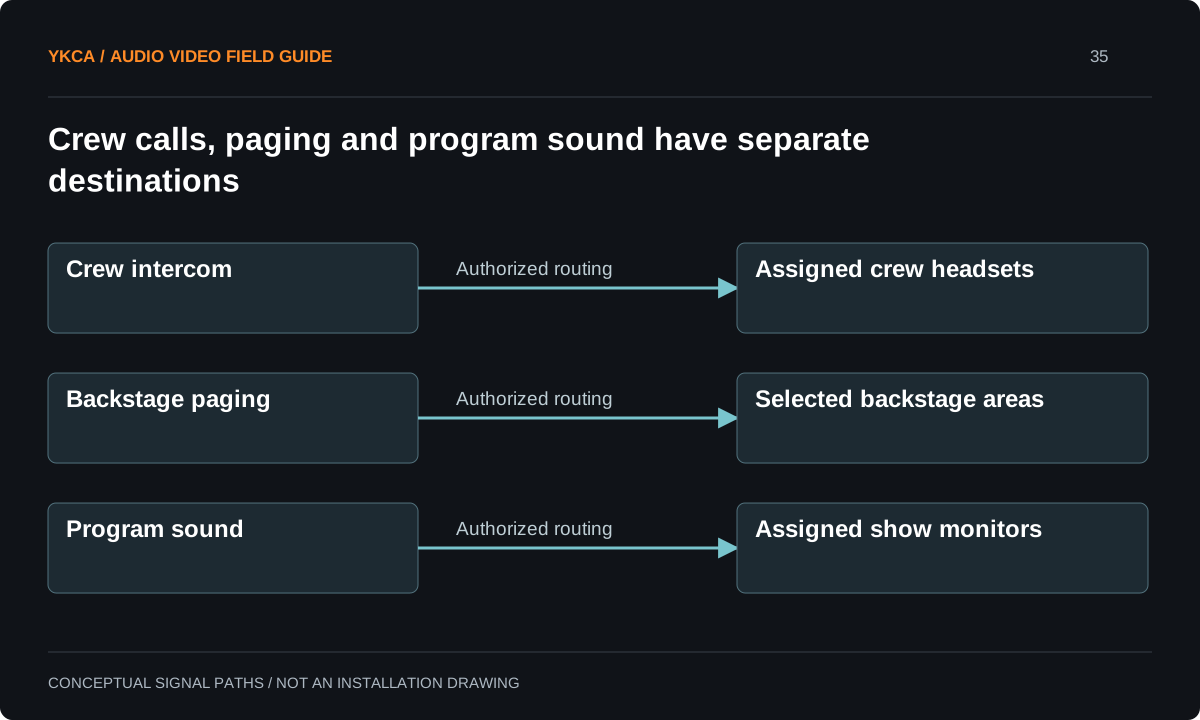
- Crew talk goes to assigned crew stations or headsets.
- Authorized paging goes to selected backstage areas.
- Program sound goes to assigned show-monitor speakers.
- Verify destinations and priorities during a rehearsal.
Clarify how calls and program audio interact
Some staff may need program sound while also receiving calls. Define whether a call should interrupt or reduce that program sound and where the behavior applies. Ask the integrator to describe the supported behavior for the actual equipment rather than using a vague promise that announcements take priority everywhere.
Clear-Com's documentation distinguishes program inputs and intercom functions, and its theater application shows separate fixed, wireless and auxiliary-space connections. These are manufacturer examples, not a prescribed design for every building. Use the actual system documentation to establish interfaces, controls and limitations. Also keep ordinary production communications distinct from any required emergency-notification system; a show paging function does not automatically fulfill that separate purpose.
Reference: Clear-Com Encore Partyline Installation Manual · Clear-Com: Theatre Control Room and Black Box
Worked example: the lobby feed stays open after the show
Imagine a lobby with speakers carrying the performance while late arrivals wait. After curtain call, the stage microphones remain live while staff clean the house. If the public feed remains connected, conversations or cleanup noise may continue into the lobby even though the performance has ended.
Define the intended post-show state and how staff reach it. The solution might involve a clearly labeled mode or an operating sequence appropriate to the installed system. Test that state at the lobby speakers, not only on a screen in the control room. Include the next startup in the check so an after-show mute does not silently prevent the required program feed at the following event.
Test visiting equipment and simultaneous room use
Guest headsets, portable interfaces and shared backstage areas can change who hears what. Establish an advance process for visiting systems and identify the approved connection points. Do not rely on connector appearance as proof that two intercom systems can be tied together. Compatibility and setup must follow the actual manufacturers' requirements and the integrator's accepted design.
For a venue with more than one performance space, test concurrent use. Staff serving one room should not accidentally receive another room's cue calls unless that is an intentional role. Walk the routes used by wireless operators and test the fixed destinations. The matrix should reflect real working assignments, including shared support areas, rather than assume every room operates independently simply because it has a separate door.
Make operating states visible and maintainable
Use control labels that describe destinations and functions in staff language. Keep the accepted routing matrix with the system drawings and identify who can modify it. Train users to announce and understand their channel assignments under the venue's communication policy. Do not promise confidentiality based only on a channel name or assume no one else can access a shared communications system.
At handoff, verify rehearsal, performance, intermission and post-show states against the matrix. Record unintended destinations as defects requiring disposition. Preserve a supported configuration backup and a simple pre-show destination check. When the venue adds a relay, recording device or remote interface later, update the matrix so its listening paths remain known and deliberate.
Compare the next steps
A decision table for this problem
| Decision or observation | What to request | Acceptance evidence |
|---|---|---|
| Crew show-call | Defined authorized destinations | Every intended station hears clearly |
| Dressing-room program | Source and call-priority behavior | Program and calls work as specified |
| Lobby relay | Public-feed operating states | Post-show state verified at speakers |
| Guest intercom interface | Compatibility and connection review | Approved integration without unwanted routing |
| Multiple rooms | Concurrent-use test matrix | Cross-room paths are intentional |
Use this in the room
Your working checklist
Common questions
Can the same cable connector mean compatible intercom?
No. Electrical and signal characteristics can differ. Use approved interfaces and the actual manufacturer documentation.
Should crew assume a channel is private?
No. Follow the venue’s stated communication policy and document who can access each path. A channel label alone does not establish privacy.
Can paging replace an emergency communication system?
Do not assume that. Required emergency functions need their own applicable design and approval; ordinary production paging serves a different operational role.
Read the original guidance
Sources and discussion context
Research used primary documents and, where full text was unavailable, indexed excerpts from official sources. A citation does not mean the complete document was accessible. Product behavior depends on the actual model, configuration and documentation. Confirm the requirements for your venue before changing the installation.
Reader problems behind this guide
These Reddit discussions helped identify the practical question. They are individual experiences, not technical authority or a measure of how common the problem is. Examples and diagrams illustrate planning decisions; they are not records of completed YKCA projects or installation drawings.
- Manager Lurking on Comms
Thread describes unexpected listeners on crew communications and an anecdote of post-show sound reaching a public relay.
Research access: search excerpt only.
Keep the whole system in view
