
Schools & universities · Practical guide
Standardize the Classroom Workflow Before the Equipment List
Create a campus AV standard that supports familiar teaching actions while allowing different rooms to meet different needs.
YKCA Journal · 5 min read · Updated October 3, 2026
Start here
Make common teaching tasks behave consistently across rooms.
Inventory the teaching actions that must transfer
A faculty member who changes classrooms should not need to relearn how to show a laptop or mute program audio. Begin a standardization project with those repeated actions: start a session, select the room computer, connect a guest laptop, show a document, play media and end the session. Add course-specific tasks only where they are actually required.
Observe several real teaching formats with permission rather than relying solely on an equipment inventory. A seminar, laboratory demonstration and large lecture may need different systems. Record what the instructor must do and what students must see or hear. This creates a standard around teaching outcomes instead of forcing every room into one hardware template.
Keep the interface familiar while allowing room differences
Extron’s interface guidance emphasizes consistency in controls and labels across rooms. Apply that principle to common tasks while letting the underlying design suit the room. A larger classroom may need a different microphone or display arrangement, but “Laptop,” “Room Computer” and “End Session” should have consistent meanings throughout the supported fleet.
Document exceptions visibly. If one room has lecture capture and another does not, make that capability clear during scheduling. Do not hide a missing function behind a control that appears to work. A consistent interface should reduce uncertainty, not create the false impression that every room provides every service.
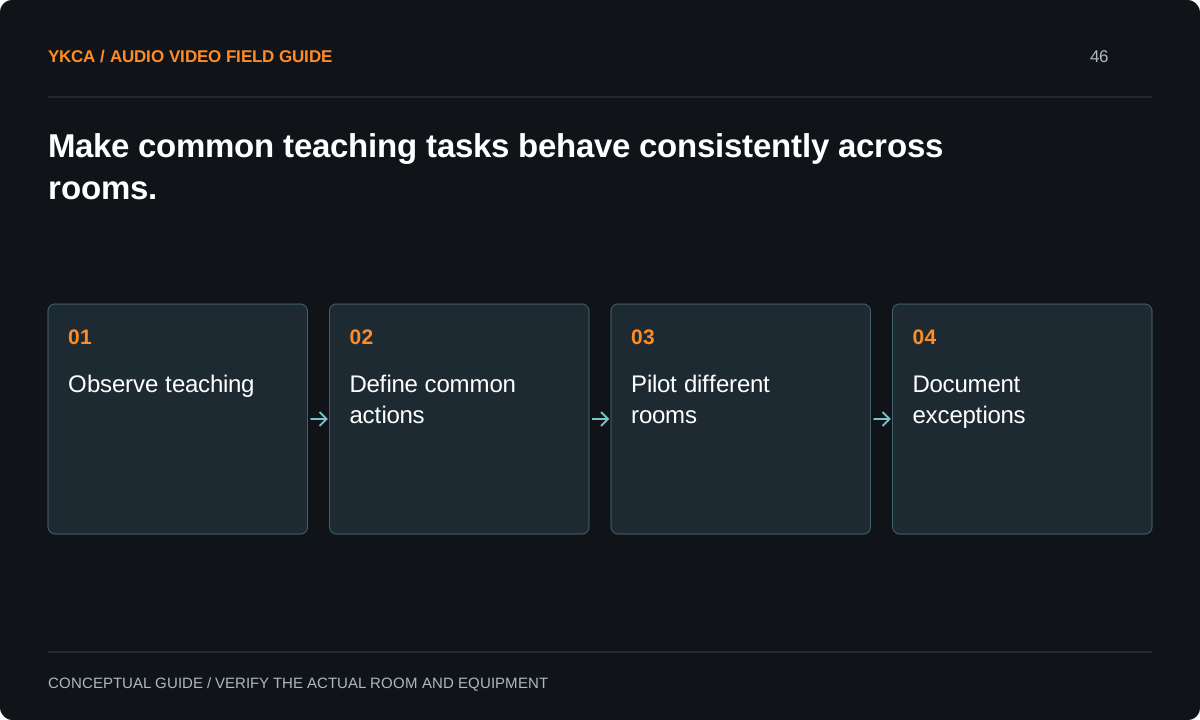
- Observe teaching
- Define common actions
- Pilot different rooms
- Document exceptions
Select a representative pilot group
Choose pilot rooms that expose important differences: room size, daylight, teaching style, accessibility needs and common guest devices. Include instructors who are unfamiliar with the proposed controls and technicians who will maintain the system. A pilot evaluated only by its designer may overlook routine confusion that becomes costly across many classrooms.
Extron’s education material presents distinct instructional applications and examples of consistent campus operation. Treat those examples as possible approaches, not evidence that a particular product is right for your campus. Build an acceptance script from your own teaching tasks and retain the results before committing to a larger rollout.
Reference: Extron: AV System Designs for Education
Run an instructor transfer test
For example, an instructor completes a short lesson in a pilot seminar room, then performs the same common tasks in a larger classroom. The displays and audio hardware differ, but source names and basic actions remain familiar. The observer records where the instructor hesitates, needs help or expects a capability that the second room does not provide.
Repeat with a substitute instructor and a supported guest laptop. Test embedded media, a session restart and shutdown as well as static slides. The useful result is a list of specific changes to labels, instructions or room capabilities. Avoid declaring the entire standard successful because one experienced person completed a demonstration.
Plan spares and exceptions as part of the standard
A standard should identify approved device families, versions, connection methods and replacement procedures. Decide which components can be substituted without changing the teaching experience and which require configuration or retesting. Keep a controlled exception record for specialist rooms, including the reason and responsible support team.
Include procurement and maintenance staff in that decision. A supposedly equivalent replacement can change device names, control behavior or connector requirements. Before broad deployment, establish how the team will stage a spare, restore configuration and confirm the classroom’s teaching tasks. This makes standardization useful after installation, when equipment eventually needs service.
In a commercial audio visual installation for education, the procurement standard should identify who can approve an exception and what evidence they need. A department may legitimately need a special source or teaching device, but that request should include the instructional task, required connection and support responsibility. Test the exception in one room before buying it for several spaces. Retain the common teaching actions wherever possible and explain any changed behavior to scheduling staff. This prevents a small local purchase from creating an undocumented support obligation across campus, while preserving a route for useful instructional tools that were not anticipated in the original standard.
Accept the classroom as a supported service
Handoff should include a room capability list for scheduling, a concise instructor guide and a technical record for support. Each serves a different reader. Keep the same room names and source labels across them. Record remaining exceptions and the process for requesting new functionality without silently changing the standard.
Acceptance requires instructors to perform representative lessons and support staff to demonstrate ordinary recovery. The current pilot can be ready while the rest of campus remains unreviewed. Report those stages separately. A sustainable classroom standard grows through verified applications and controlled exceptions, not a claim that the same shopping list solves every learning space.
Compare the next steps
A decision table for this problem
| Situation | Operating decision | Evidence to check |
|---|---|---|
| Common lecture or seminar | Use familiar source and session controls | Instructor transfers common tasks between rooms |
| Specialist laboratory | Keep common controls plus documented exception | Required demonstration workflow tested |
| Different room size | Adapt hardware to instructional need | Student seating and pickup requirements verified |
| Replacement component | Use approved substitution procedure | Labels and teaching functions remain correct |
| Campus expansion | Validate another representative room type | Pilot results do not imply untested coverage |
Use this in the room
Your working checklist
Common questions
Is one brand a classroom standard?
Not by itself. A useful standard also defines teaching behavior, support responsibilities, approved versions, documentation and how exceptions are handled.
Should specialist rooms follow the same interface?
They can preserve familiar common actions while adding clearly identified specialist functions. Do not remove required teaching capabilities merely to make every screen identical.
When is a pilot ready to scale?
After representative instructors complete required tasks and support staff verify recovery, replacement and documentation. Unresolved pilot issues should be corrected or explicitly accepted before expansion.
Read the original guidance
Sources and discussion context
Research used primary documents and, where full text was unavailable, indexed excerpts from official sources. A citation does not mean the complete document was accessible. Product behavior depends on the actual model, configuration and documentation. Confirm the requirements for your venue before changing the installation.
Reader problems behind this guide
These Reddit discussions helped identify the practical question. They are individual experiences, not technical authority or a measure of how common the problem is. Examples and diagrams illustrate planning decisions; they are not records of completed YKCA projects or installation drawings.
- First-time School AV Tech—What Should I Expect?
School AV support discussion raised inconsistent equipment, training and spare inventory as recurring operational concerns.
Research access: search excerpt with post text; not independently opened.
Keep the whole system in view
