
Schools & universities · Practical guide
Replacing School Paging Without Losing the School-Day Workflow
Inventory bells, classroom calls, zoning and existing notification interfaces before replacing an aging school public-address system.
YKCA Journal · 5 min read · Updated October 3, 2026
Start here
Preserve the functions the school actually relies on.
Inventory functions before counting speakers
An aging school paging system may carry daily announcements, bell schedules, classroom calls and interfaces that staff rarely see. Begin with an observed school-day workflow and existing documentation. Ask office staff how they make an announcement, teachers how classroom communication works and facilities staff what else is connected. Record unknown connections for investigation instead of assuming they are unused.
Build a function list with owner, destination and priority. A gym announcement, a classroom call and a campus-wide message should not be treated as equivalent simply because they use speakers. This inventory gives the replacement team a scope that reflects the school’s operations and helps identify functions a basic zone amplifier would not replace.
Separate ordinary paging from emergency responsibilities
AtlasIED describes dedicated integrations for school paging, bells and notification endpoints. Its Atmosphere products provide another set of zone-audio functions. Product capabilities can inform a design, but a product page is not approval for a particular school’s emergency system. The responsible design and safety teams must determine applicable requirements and the accepted architecture.
Identify any existing fire alarm, emergency notification or security interface before planning disconnection. Keep its ownership explicit. Do not schedule an informal live test merely because the new amplifier can play a message. Any test affecting emergency functions belongs in the school’s authorized procedure with the appropriate coordination.
Reference: AtlasIED: school communications and notification systems · AtlasIED: AZMP4
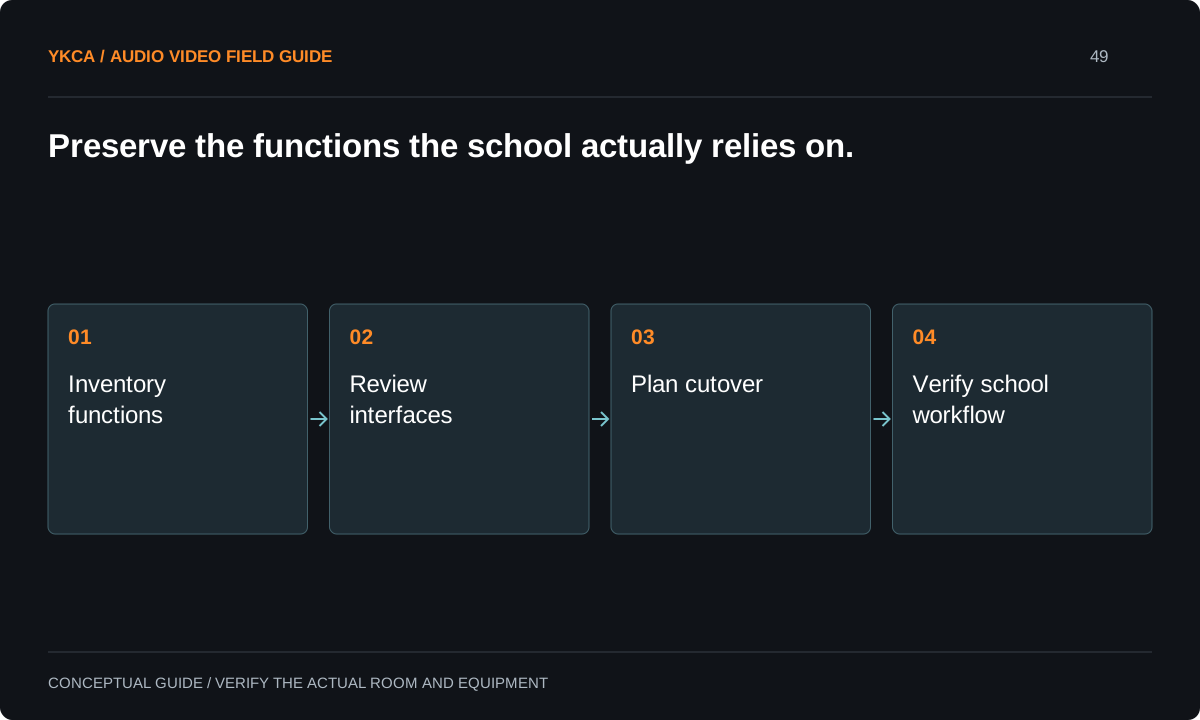
- Inventory functions
- Review interfaces
- Plan cutover
- Verify school workflow
Check the installed infrastructure deliberately
Have a qualified technician document speaker circuits, zones, equipment locations and the condition of reusable components. The existing wiring and speakers may be reusable, partially reusable or unsuitable for the proposed system; age alone does not settle that question. Record the basis for the decision and any tests required before reuse is accepted.
Ask how the design handles power interruption, network loss and component failure for each required function. The answer may differ between ordinary music and a notification path. Keep those distinctions in the scope so a bidder does not price only normal operation while the school assumes resilience that was never specified.
Plan a controlled school-day cutover
For example, a replacement is scheduled during a school closure. Before work begins, staff confirm an interim communication procedure. The installation team changes the agreed equipment, verifies labeled zones using authorized test material and restores the ordinary bell schedule in coordination with administration. Emergency-related interfaces receive their separate required review and testing process.
The cutover plan should include a rollback decision point and the person who can authorize returning to the previous configuration if necessary. Preserve the information needed for that recovery. Do not rely on an installer’s memory of an unlabeled terminal strip or leave the first real school morning as the only comprehensive test.
Test the people and places affected
For ordinary paging acceptance, use the actual office controls and check the intended destinations. Confirm that a selected zone receives the message and an excluded zone does not. Test bell scheduling against the approved calendar, including any different daily schedules the school uses. Have teachers and office staff confirm the operating procedure from their normal positions.
Document limitations such as an inaccessible room, an unverified circuit or an interface awaiting another contractor. Those are open items, not reasons to declare the whole project finished. Where a regulated function is involved, retain the appropriate formal test and acceptance records through the responsible team rather than substituting a casual listening check.
A commercial audio system installation proposal should identify which school-day functions remain outside its scope. A bidder may provide ordinary zone announcements while another team owns classroom intercom, clock synchronization or emergency notification. Put those boundaries in a shared scope table with the school, not only in separate contractor exclusions. For each interface, name who supplies it, who configures it and who verifies the completed behavior. Resolve gaps before the cutover date. This makes proposals comparable and prevents a familiar control from disappearing because every participant assumed someone else was responsible for recreating its connection to the new equipment.
Hand over a usable communications record
The school should receive a zone map, source and priority list, equipment record, operating instructions and contact responsibilities. Keep configuration backups and administrative access under institutional control. Explain which changes office staff may make, such as an approved schedule adjustment, and which require technical or safety review.
Acceptance should state exactly what has been verified: ordinary paging, bells, classroom functions and any separately reviewed notification interfaces. Do not collapse them into one claim that “the PA works.” A clear record makes the next repair safer and faster because the school knows which service each component supports and who owns the decision to change it.
Compare the next steps
A decision table for this problem
| Situation | Operating decision | Evidence to check |
|---|---|---|
| Daily announcements | Map intended zones and controls | Office staff complete selected-zone test |
| Bell schedule | Load approved school calendar | Normal and alternate schedules verified |
| Existing emergency interface | Assign qualified review and test owner | Applicable acceptance record retained |
| Reusable speakers or wiring | Inspect and test proposed reuse | Condition and compatibility documented |
| Cutover cannot finish | Use authorized interim or rollback plan | Administration knows current capability |
Use this in the room
Your working checklist
Common questions
Can restaurant zone equipment replace a school PA?
Only if a qualified design confirms it meets the defined ordinary functions and any required interfaces. Similar speaker counts do not establish equivalent communication or emergency capability.
Should every existing speaker be replaced?
Not automatically. Inspection, testing and compatibility review should establish what can be reused. Document unknowns and the limits of any reuse decision.
Can we test emergency messages after hours without coordination?
Do not assume that after-hours testing is harmless. Use the school’s authorized process and coordinate with the parties responsible for the affected systems and recipients.
Read the original guidance
Sources and discussion context
Research used primary documents and, where full text was unavailable, indexed excerpts from official sources. A citation does not mean the complete document was accessible. Product behavior depends on the actual model, configuration and documentation. Confirm the requirements for your venue before changing the installation.
Reader problems behind this guide
These Reddit discussions helped identify the practical question. They are individual experiences, not technical authority or a measure of how common the problem is. Examples and diagrams illustrate planning decisions; they are not records of completed YKCA projects or installation drawings.
- Looking for a multi-zone system for school
A school sought to replace a failing older PA using restaurant-style zone equipment, while needing classroom, gym and office zones.
Research access: search excerpt with post text; not independently opened.
Keep the whole system in view
