
Stage & architectural lighting · Practical guide
Stage Lighting Looks Fine in Person but Flickers on Camera
A commissioning plan for LED fixtures, dimming levels and the cameras used for recording or streaming.
YKCA Journal · 5 min read · Updated October 3, 2026
Start here
Test the actual fixture-camera combination across the intended dimming and recording modes.
Establish whether the camera reveals the problem
Observe the lighting directly, then compare the camera preview and recorded output. Note whether the issue appears on faces, illuminated scenery or the fixture itself. A rolling band in the recording and a visible electrical flicker in the room are different observations, even if an operator calls both flicker. Record the camera model, frame rate, shutter setting, fixture model, control mode and intensity. It shows why the camera requirement belongs in procurement, but it does not establish that a product described casually as flicker-free will work in every recording mode.
Read the selected fixture’s documented controls
Pulse-width modulation, or PWM, is one way LED output is controlled by rapidly switching it. The interaction with camera sampling can reveal artifacts that are not obvious to the eye. ETC documents a higher-frequency option for covered ColorSource fixtures, adjusted through Remote Device Management, or RDM. That is a specific product capability, not a setting available on every LED fixture. Lutron’s broader LED guidance also emphasizes dimming performance and compatibility. Ask the vendor which camera-related settings the proposed fixture actually supports, how they are accessed and which operating modes were tested. Keep the answer attached to the exact model and configuration.
Reference: ETC: Flickering or Rolling on Camera with ColorSource Fixtures · Lutron: troubleshooting LED dimming and flicker
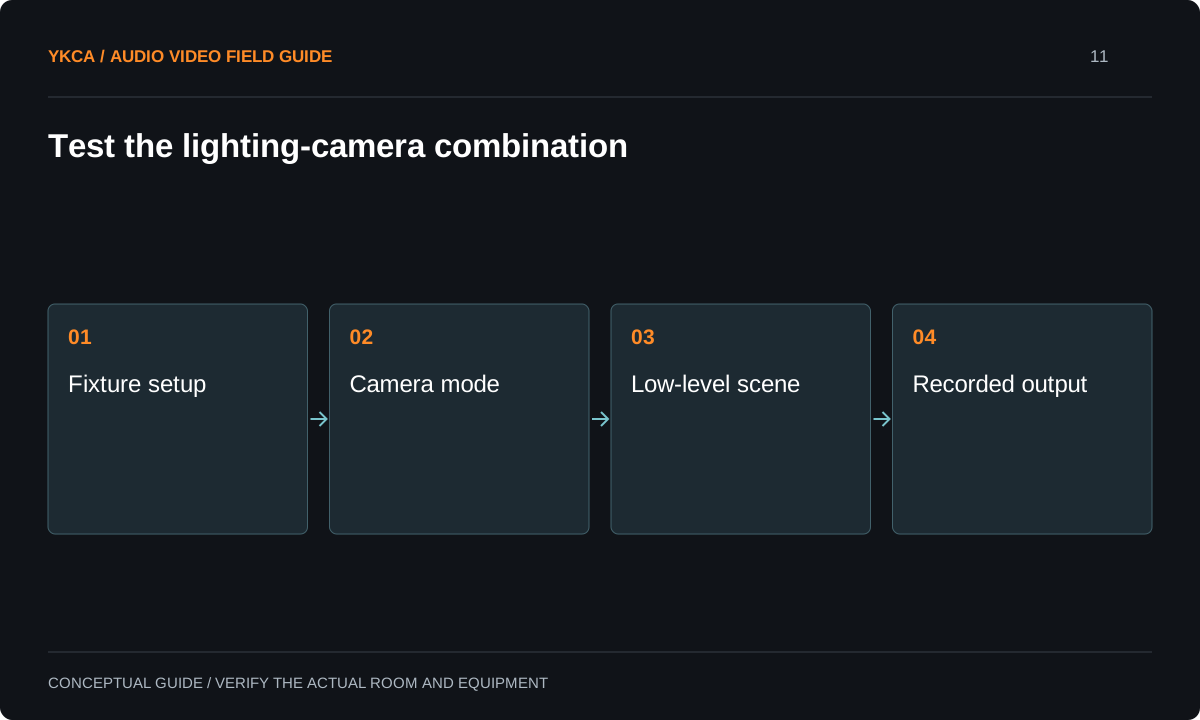
- Fixture setup
- Camera mode
- Low-level scene
- Recorded output
Create a meaningful sample test
A useful mockup uses the actual light engine, driver or decoder, control method and camera. For LED tape, a short unrelated sample with a different driver may not represent the final assembly. Have the responsible installer prepare a safe sample arrangement within the manufacturer’s requirements. Record a steady level, the lowest intended scene and a slow fade. Test planned camera modes rather than an arbitrary phone slow-motion setting. Extreme slow motion can reveal behavior outside the agreed use, but that does not replace testing the actual production. Conversely, ordinary-speed success does not certify a future high-speed recording requirement.
Reference: ETC: Flickering or Rolling on Camera with ColorSource Fixtures · Lutron: troubleshooting LED dimming and flicker
Compare a recording problem
Imagine a small stage that looks stable to the audience but develops bands during a recorded interview at a dim scene. The test team holds the camera and scene constant, then compares documented fixture settings one at a time. It checks the resulting image and the fade quality, not just whether the bands disappeared. Next it repeats the accepted condition with the second camera used for the wide shot. If no approved combination works, the equipment or production requirement needs review before installation proceeds.
Coordinate the compromise with production staff
Changing shutter settings can alter motion appearance and exposure. Changing a fixture mode may affect other aspects of operation, depending on the documented product behavior. The lighting designer and camera operator should agree on the result together. Do not let one department declare success while the other inherits an unusable image. Test skin tones, reflective surfaces and the actual scenic materials. If mixed fixture types illuminate the same subject, include them together. Record the final program output as well as individual previews, because the owner cares about what the audience receives, not only what looked clean on a monitor beside the rack.
Protect the approved configuration
Save the fixture mode, firmware where relevant, control personality and camera settings in the handoff. A control personality is the selected arrangement of channels used to operate a fixture. Document how to restore the approved setup after a rental fixture, software update or replacement camera is introduced. Give operators a short list of supported production modes and a contact for exceptions. If the venue plans to expand streaming later, retain the test evidence as a starting point rather than claiming future cameras are automatically compatible. Camera acceptance is a tested combination of equipment and settings, not a permanent guarantee attached to an LED label.
Include a recording requirement in the stage lighting installation brief even if streaming will begin after the room opens. Ask which camera modes can be tested now and identify future modes as unverified. A fixture supplier should receive the complete intended use, including slow fades, interview scenes and mixed ambient lighting, so the sample test reflects the project. Save a small acceptance matrix rather than a single statement that the lights passed: each row can name the camera mode, scene, fixture setting and observed result. When a camera operator later requests a different shutter or frame rate, the team can see exactly which part of the original evidence applies and which combination needs a new check.
Compare the next steps
A decision table for this problem
| Test condition | What to observe | Why it matters |
|---|---|---|
| Normal scene at production frame rate | Bands or pulsing on faces | Primary recording use |
| Lowest intended light level | Steadiness and noise in image | Low-level behavior may differ |
| Slow fade | Artifacts through the transition | Static tests miss cue behavior |
| Second camera or lens setup | Matched clean output | One camera is not complete coverage |
| Final encoded program | Audience-visible result | Preview alone is insufficient |
Use this in the room
Your working checklist
Common questions
Can a phone prove the lights are flicker-free?
A phone can reveal a problem, but it does not certify every camera. Use the actual production cameras and required recording modes for acceptance.
Is a higher PWM setting always better?
Use the manufacturer’s documented options and evaluate the complete result. Do not assume a setting exists or that changing it has no other consequences.
Should we change the camera before the lights?
Compare supported options with both lighting and production staff. The correct choice depends on the required image, motion, exposure and fixture behavior.
Read the original guidance
Sources and discussion context
Research used primary documents and, where full text was unavailable, indexed excerpts from official sources. A citation does not mean the complete document was accessible. Product behavior depends on the actual model, configuration and documentation. Confirm the requirements for your venue before changing the installation.
- ETC: Flickering or Rolling on Camera with ColorSource Fixtures↗
- Lutron: troubleshooting LED dimming and flicker↗
Reader problems behind this guide
These Reddit discussions helped identify the practical question. They are individual experiences, not technical authority or a measure of how common the problem is. Examples and diagrams illustrate planning decisions; they are not records of completed YKCA projects or installation drawings.
- Looking for high quality LED strip lighting that wont flicker on camera
A production using LED strips had experienced camera flicker and needed a dependable selection process.
Research access: search excerpt only.
Keep the whole system in view
