
Stage & architectural lighting · Practical guide
Random DMX Flicker: Isolate the Control Path Before Replacing Fixtures
A structured investigation of intermittent lighting commands, cable topology, fixture modes and controller changes.
YKCA Journal · 6 min read · Updated October 3, 2026
Start here
Keep a reproducible test and change one part of the DMX path at a time.
Record what changed before the first fault
A new lighting interface, added fixture, altered patch or longer control run can provide a useful lead without proving the cause. Note the first known occurrence and describe the visible behavior: a brief intensity flash, color jump, movement twitch or total loss of control. Record which devices share the affected branch and whether the problem occurs at a repeatable interval. That is a reason to compare the complete control sources, not a reason to condemn every fixture in the chain.
Separate data integrity from programming behavior
DMX512 is a control-data protocol used by many lighting systems. ETC’s support guidance identifies termination and cable condition as important checks and recommends a short direct-path comparison for a misbehaving device. Separately, the selected fixture mode and programmed patch determine how received channel values are interpreted. A sound cable cannot correct a mismatched personality. Multiple active control sources can introduce another layer: ETC documents a particular Echo scene-controller interaction that changes recalled colors. That example is product-specific, and DMX does not by itself define one universal merge behavior for every networked lighting system. Review the actual devices and configuration.
ETC specifies DMX-rated, impedance-matched data cable; an XLR connector does not make microphone cable suitable. Each DMX line needs the specified termination at its far end, commonly a 120-ohm DMX terminator. Do not create branches with a passive Y cable. Use the appropriate active, preferably optically isolated, DMX splitter, with each output treated as its own branch. Have the technician check the splitter's power and termination as well as the cables. These are data-path checks; they do not authorize opening mains-powered equipment or accessing overhead fixtures without a safe work plan.
Reference: ETC: DMX512 Info · ETC: Echo DMX Scene Controller Presets Always White
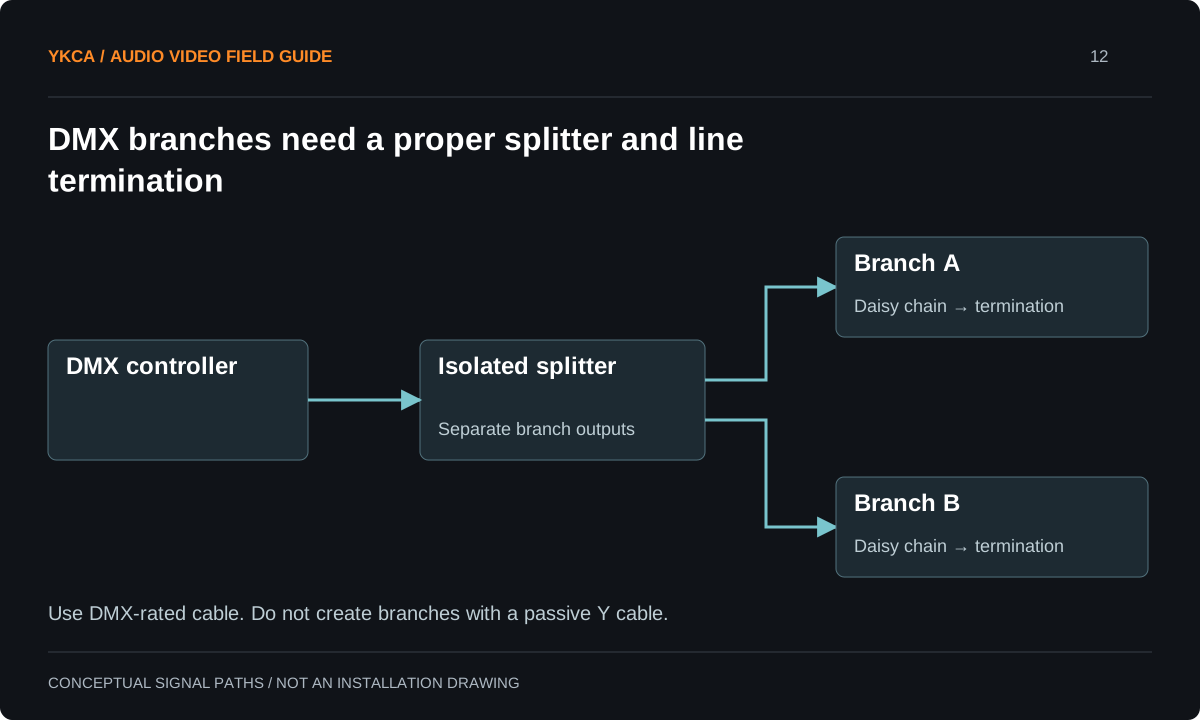
- The controller sends DMX to an optically isolated splitter.
- Each splitter output feeds a separate daisy-chain branch.
- Each branch ends with the required termination.
- A passive Y cable is not a substitute for a DMX splitter.
Build a controlled comparison safely
Have a qualified technician choose an accessible fixture and a known suitable data path. Compare the original controller with the alternate controller while preserving the same fixture mode and test cue. Then restore the installed path one segment at a time as practical. Label every change and keep the original configuration available. Do not enter overhead work areas or open electrical equipment merely to perform a quick experiment. Fault isolation should use an agreed work window and safe access. The goal is to discover which change follows the symptom, not to make the lights behave temporarily by rearranging several unrelated settings together.
If a fixture still misbehaves on a known-good short direct connection, compare the transmitter's supported DMX output-speed settings. ETC explicitly suggests this check for its transmitting products. Keep the fixture mode, address and cue unchanged, record the original setting, and test a supported slower setting. That test can reveal a receiver's timing sensitivity, but it should not be used to hide faulty installed cabling. Restore the complete intended rig and run the same sequence before accepting the adjustment.
Reference: ETC: DMX512 Info · ETC: Echo DMX Scene Controller Presets Always White
Use an intermittent case
Imagine a branch that flashes every several minutes under a software controller but remains stable under a console. A technician runs the same simple static cue through each approved source long enough to cover the reported interval. The comparison then examines the interface configuration, supported data behavior and relevant manufacturer guidance. If a fixture-specific option is changed, the test log names it and records the result. This sequence does not assume software is at fault; the source and receiver interaction may matter. Repeating the original symptom under controlled conditions is more informative than adding a new splitter and hoping the next event passes.
Retest the complete operating system
A single fixture working on a short cable establishes a useful baseline, not a finished repair. Restore the intended branches, splitters, controllers and fixture inventory, then run representative cues. Include fades, color changes, moving fixtures where present and architectural-control transitions. Confirm that the patch still matches physical labels. Observe for a duration relevant to the prior intermittent behavior and save available logs. If the symptom disappears only when a documented feature is disabled, describe that tradeoff explicitly and obtain the appropriate project decision. Do not silently remove an expected capability and report the system as fully commissioned.
Leave a map that supports the next technician
The owner should receive the DMX branch layout, fixture addresses, operating personalities, controller configuration and approved test result. Keep a versioned show or configuration file with the venue’s normal baseline. Explain which resets or factory-default actions would erase the accepted modes. Staff should know how to report a branch-wide fault and how to select an approved fallback scene, without being expected to repair data connectors during an event. When fixtures are replaced or added, repeat the relevant tests. Reliable control depends on the installed topology and compatible settings, not solely on whether each product worked individually when unpacked.
For stage lighting installation support, retain a branch-by-branch inventory that links the physical label to the programmed address and personality. This can expose a simple replacement mismatch before anyone starts altering the network. Give a visiting production a documented connection point and an agreed process for returning the venue to its baseline afterward. If outside equipment temporarily changes the control topology, preserve that temporary arrangement in the incident record when a fault occurs. “The rig worked yesterday” becomes more useful when yesterday’s controller, interface, fixture list and configuration are known. These records do not replace technical testing, but they make a repeatable comparison possible and help avoid treating every event as a new, undocumented installation.
Compare the next steps
A decision table for this problem
| Symptom pattern | First comparison | Evidence to retain |
|---|---|---|
| One fixture behaves incorrectly | Address and personality versus patch | Fixture model and mode |
| Whole downstream group flickers | Shared cable segment or branch | Topology and affected units |
| Only alternate controller fails | Same cue through both sources | Controller/interface settings |
| Scene changes color unexpectedly | Other active control sources | Merge and priority configuration |
| Fault appears after several minutes | Sustained repeatable test | Timestamp and duration |
Use this in the room
Your working checklist
Common questions
Does a terminator fix every flicker problem?
No. Correct termination is an important check, but fixture modes, cabling, interfaces and multiple control sources can create different problems.
Are microphone cables suitable for DMX because the plugs fit?
No. Use DMX-rated data cable with the required impedance and termination. ETC explicitly warns against microphone cable for DMX; identical-looking connectors do not establish electrical suitability.
Can we call it fixed after one successful rehearsal cue?
Not when the original fault was intermittent. Run a test that covers the reported failure interval and the complete intended control configuration.
Read the original guidance
Sources and discussion context
Research used primary documents and, where full text was unavailable, indexed excerpts from official sources. A citation does not mean the complete document was accessible. Product behavior depends on the actual model, configuration and documentation. Confirm the requirements for your venue before changing the installation.
Reader problems behind this guide
These Reddit discussions helped identify the practical question. They are individual experiences, not technical authority or a measure of how common the problem is. Examples and diagrams illustrate planning decisions; they are not records of completed YKCA projects or installation drawings.
- HELP: Lightkey DMX Flickering at random
Fixtures flickered intermittently with one software/interface setup but not with a physical lighting console.
Research access: search excerpt only.
Keep the whole system in view
