
Houses of worship · Practical guide
A Church Livestream Mix a Small Volunteer Team Can Maintain
Choose a sustainable room-to-stream audio workflow with separate listening checks, clear mute behavior and realistic staffing.
YKCA Journal · 6 min read · Updated October 3, 2026
Start here
Choose the mix workflow your volunteers can verify every week.
Write down what the online listener is missing
A livestream listener hears the feed, while someone in the sanctuary also hears instruments and voices directly. Ask reviewers to identify the specific problem: missing guitar, unclear speech, abrupt level changes, or a congregation that disappears between songs. These are different decisions. Turning up the final stream output may make everything louder while preserving the wrong balance.
Collect a short authorized rehearsal sample containing speech, a loud song and a quiet transition. Keep notes with time references instead of asking whether the whole service sounded good. Make the online listener’s experience a recurring responsibility, with a backup person when the regular reviewer is absent. Do not use private conversations as test material.
Choose between a shared feed and a separate workflow
Three practical options are a controlled copy of the room mix, a dedicated console mix, or a separate broadcast mixing position. A console mix is a group of channel contributions routed to its own output. A separate position may offer more freedom, but it also adds staffing, monitoring and maintenance responsibilities. More independence is only useful when somebody can manage it.
For a small team, compare the actual controls available on the existing console before adding software. The classic Allen & Heath Qu reference guide documents mix routing and monitoring for that family. Other models differ. Ask the technician to demonstrate the proposed feed using your installed firmware and output connections rather than assuming a menu label means the same thing everywhere.
Reference: Allen & Heath: Qu Mixer Reference Guide, issue 10
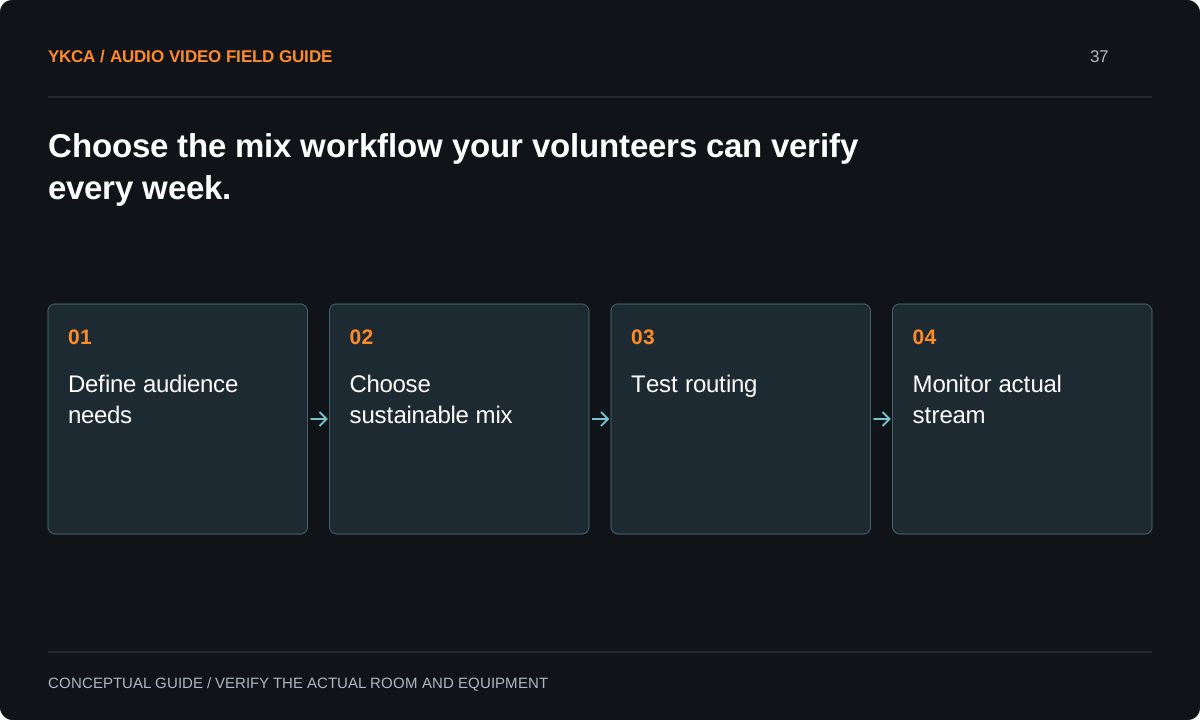
- Define audience needs
- Choose sustainable mix
- Test routing
- Monitor actual stream
Make fader and mute behavior explicit
A pre-fader contribution is taken before a channel’s main level control; a post-fader contribution follows that control. Neither label alone tells a volunteer everything about mute behavior, processing or final output level. Create a small test chart: move the room fader, mute the channel, recall the service scene and change the main room level. Listen to the resulting stream after each action.
Record which actions should affect both audiences and which should remain independent. Speech microphones need predictable muting, especially before and after services. Avoid building a workflow in which a volunteer believes a private microphone is closed because the sanctuary is silent, while a different route continues to send it online.
Use a representative rehearsal to set the workflow
For example, a two-person team assigns one volunteer to the sanctuary and the other to video switching plus scheduled stream checks. The technician prepares a stream mix that tracks selected channel changes, with speech and music balanced during rehearsal. The reviewer checks the outgoing feed before doors open, after the first song and at the sermon transition.
This does not promise that one person can continuously mix two audiences. It makes the compromise visible. If the program adds an ensemble, guest instruments or remote callers, the team revisits staffing and routing. A repeated need for emergency corrections is evidence that the workflow has exceeded its operating capacity, even when every device is functioning.
Listen beyond the console headphones
Headphones connected to the console prove only the signal at that listening point. The encoder, streaming application, platform and viewer device remain downstream. Use a separate device to check the actual rehearsal stream, with its sound isolated from open room microphones. Watch for duplicated laptop pickup, missing channels and changes introduced after the console.
Agree on a repeatable playback level and a short comparison routine. Loudness meters can support consistency, but a single target number does not establish balanced speech, natural music or intelligible words. Ask the responsible technician to document the measurement method and its purpose. Keep subjective balance comments separate from clipping or silence observations so the next correction addresses the right layer.
When planning church audio visual installation, include the relationship between private rehearsal, the public stream and any archived copy. The volunteer should know which action starts transmission, which starts recording and whether those are the same action. Put an unmistakable verification step at the beginning and end of the public portion. During a rehearsal, ask a second person to confirm the actual public destination is closed before informal stage conversation begins. This is an operating check rather than a guarantee of privacy from a mute button. Keep the video and audio teams aligned on the same start and finish cues.
Hand off a recoverable Sunday setup
Keep the stream output name, destination, monitoring method and essential mute behavior on one page. Save the current console configuration and streaming settings through their supported backup methods. Assign one owner to approve routing changes and record why they were made. A substitute volunteer should be able to identify the active feed without tracing unfamiliar cables.
Acceptance means that the actual team can start the system, verify speech and music, move between program sections and close all public feeds afterward. Include a fallback, such as a simplified spoken service feed, for a failed component. Test that fallback during rehearsal. A sophisticated broadcast chain without a usable recovery procedure is not ready for routine volunteer operation.
Compare the next steps
A decision table for this problem
| Situation | Operating decision | Evidence to check |
|---|---|---|
| Room sounds good, stream lacks instruments | Review channel contributions to stream | Authorized rehearsal includes every instrument |
| Speech jumps above songs | Compare program transitions | Same listening device and playback setting |
| Too few volunteers for another mixer | Use a supported console feed first | Named person can verify it during service |
| Console headphones sound right | Check the encoded output separately | Actual viewer feed includes correct sources |
| A microphone is muted in the room | Verify every public destination | No unintended microphone remains online |
Use this in the room
Your working checklist
Common questions
Is a dedicated broadcast console mandatory?
No. A separate console may be justified by program complexity and staffing, but a clearly routed and monitored feed from the existing console can be the better first step.
Should we add congregation microphones?
Only for a defined purpose and with controlled routing. Congregational ambience and intelligible individual speech are different pickup tasks. Test the benefit and exclude private or unwanted pickup.
Can we fix balance with the platform volume control?
That control changes the combined signal. It cannot recover an instrument that never reached the feed or independently rebalance speech against music.
Read the original guidance
Sources and discussion context
Research used primary documents and, where full text was unavailable, indexed excerpts from official sources. A citation does not mean the complete document was accessible. Product behavior depends on the actual model, configuration and documentation. Confirm the requirements for your venue before changing the installation.
Reader problems behind this guide
These Reddit discussions helped identify the practical question. They are individual experiences, not technical authority or a measure of how common the problem is. Examples and diagrams illustrate planning decisions; they are not records of completed YKCA projects or installation drawings.
- Live stream mix for small church
A small volunteer team copied the room mix into OBS and found the stream empty; a separate DAW was impractical.
Research access: search excerpt with post text; not independently opened.
Keep the whole system in view
