
Video & LED walls · Practical guide
Lip Sync Works on One Output but Fails on Another
How to map recording, room-screen and remote-call paths before adjusting audio delay.
YKCA Journal · 5 min read · Updated October 3, 2026
Start here
Measure each destination separately; one delay setting may not fit every branch.
Name the destination before calling it synchronized
“The video is in sync” is incomplete unless everyone is watching and listening to the same output. A local recording, room screen, switcher monitor and remote meeting can use different paths. Start by drawing those destinations and identifying where their audio and video originate. Do not assume that a clean switcher preview certifies a USB conferencing feed or that a remote complaint proves the local recording is defective.
Understand what a delay control can change
An audio delay deliberately holds sound back so it can align with a later-arriving image. Blackmagic’s ATEM Mini manual documents delay adjustment for covered analog inputs, and its specifications show that facilities vary by model. Those product capabilities do not tell you which branch needs adjustment in an arbitrary system. If audio is already late, delaying it further is the wrong direction. Identify the supported adjustment points and their units. Frames and milliseconds are related through the operating frame rate; a copied number from another system is not a substitute for measuring the required alignment at your destination.
Reference: Blackmagic Design: ATEM Mini Manual · Blackmagic Design: ATEM Mini Technical Specifications
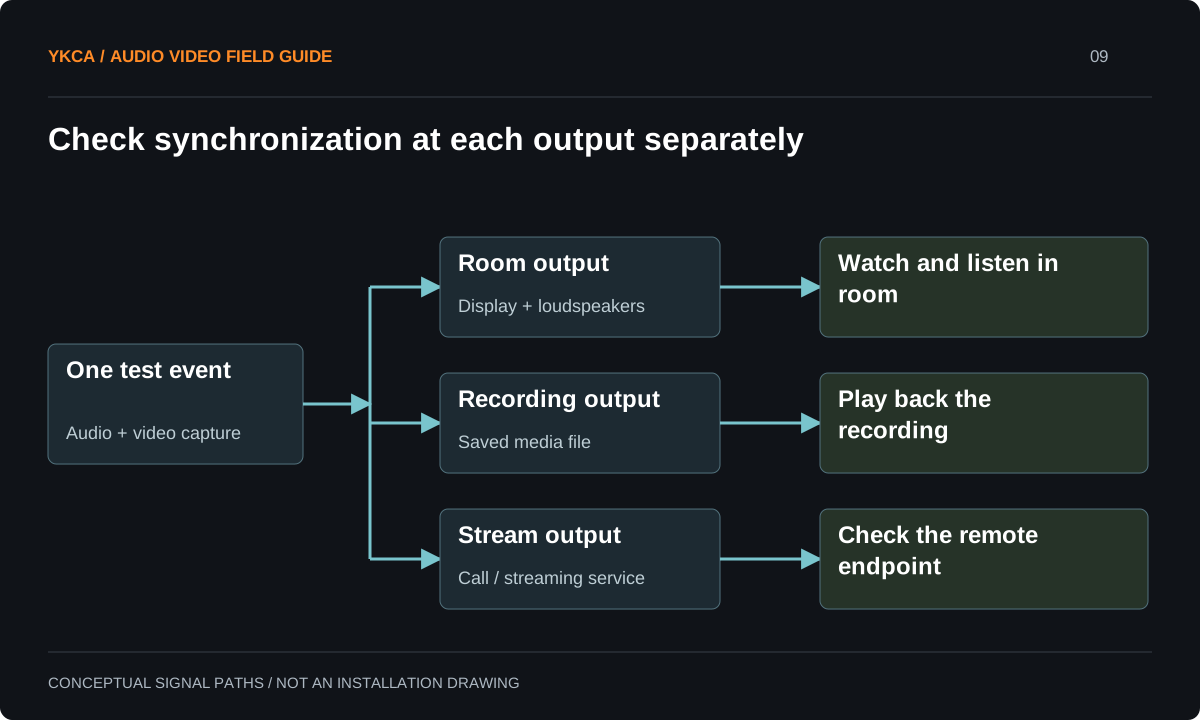
- One test event enters the audio and video capture paths.
- Check the room display against the audio heard in the room.
- Check synchronization in the saved recording.
- Check the remote endpoint independently of the recording.
Trace the split points
List every stage that can place audio and video on different routes: camera output, separate mixer connection, switcher, capture interface, display processing, recording and meeting application. This is a functional map rather than a demand to measure every internal electronic stage. Determine which outputs share an adjustable path and which have independent facilities. Confirm that the intended audio device is selected in the meeting software. A remote application using a separate microphone can undermine an otherwise aligned embedded feed. Record these selections with the routing drawing so a future computer update or operator change can be checked against an established baseline.
Reference: Blackmagic Design: ATEM Mini Manual · Blackmagic Design: ATEM Mini Technical Specifications
Run a two-destination test
Imagine a presentation system feeding a local recorder and a remote call. A visible clap with an audible transient, captured in a controlled test, shows an offset at the remote destination but acceptable alignment in the local recording. Compare the feed entering the conferencing computer with what the remote endpoint receives. Keep the local path unchanged while isolating the difference. This example does not assume the application is responsible; it shows where to measure next. If the available hardware cannot adjust the branches independently, that limitation becomes a design decision. Hiding it with a compromise setting may leave both audiences dissatisfied.
Separate a fixed offset from drift
Repeat the observation at the beginning and later in a sustained test. A stable mismatch and a mismatch that grows over time suggest different investigations. Record the operating format, source configuration and duration instead of describing every discrepancy as latency. Latency is overall delay; lip-sync error is the difference between the corresponding sound and image. A remote call can have appreciable overall delay while maintaining alignment, or low overall delay with visibly mismatched lips. Acceptance should address the required conversational experience as well as synchronization, particularly when a remote participant must interact naturally with someone on stage.
Keep the accepted settings attached to each mode
After adjustment, repeat the complete set of intended destinations and camera or source changes. Include any approved recording mode and the meeting platform configuration. Save the equipment settings, routing drawing and a short test record. Operators should recall a named operating mode rather than remember unexplained delay values. If one mode uses a different audio path, make that difference explicit in the control logic and support documentation. Future equipment replacement should include a synchronization check, even if all connectors fit, because the timing behavior of the complete path is part of the commissioned result.
A commercial audio video installation benefits from a destination worksheet that distinguishes “heard directly in the room” from “heard through the program feed.” Watching a room screen while listening to nearby live speech is not the same timing test as watching a recording with its embedded sound. Label each observation accordingly. For a formal review, choose a repeatable non-sensitive test and preserve the original file or capture with its format information. Compare the same event at each destination before changing settings. If the owner adds a new streaming platform later, treat it as a new output branch to verify. The existing local recording can remain a useful baseline, but it does not certify that new audience path.
Compare the next steps
A decision table for this problem
| Destination pattern | Next observation | Decision it supports |
|---|---|---|
| Recording good, call wrong | Feed entering meeting computer | Branch-specific mismatch |
| All outputs show early audio | Common upstream path | Possible shared alignment adjustment |
| Only one display is wrong | Display processing and local feed | Endpoint-specific behavior |
| Mismatch grows during test | Start/end comparison with timestamps | Drift investigation |
| Correct alignment, slow conversation | End-to-end interaction test | Overall latency requirement |
Use this in the room
Your working checklist
Common questions
Can we copy a recommended delay value?
Use it only as a documented starting point if appropriate to the equipment. The required value depends on the actual paths and must be verified at the final output.
Does a clap test replace professional measurement?
It is a useful practical indicator when performed carefully. If the project requires a formal tolerance, specify the test method and measurement equipment with the designer.
Will changing the USB cable fix lip sync?
A cable replacement is not a general timing correction. First establish where the mismatch appears and whether the intended devices and paths are being used.
Read the original guidance
Sources and discussion context
Research used primary documents and, where full text was unavailable, indexed excerpts from official sources. A citation does not mean the complete document was accessible. Product behavior depends on the actual model, configuration and documentation. Confirm the requirements for your venue before changing the installation.
Reader problems behind this guide
These Reddit discussions helped identify the practical question. They are individual experiences, not technical authority or a measure of how common the problem is. Examples and diagrams illustrate planning decisions; they are not records of completed YKCA projects or installation drawings.
- Audio/Video Sync issue when using ATEM as a webcam
A delay adjustment aligned one output but left a conferencing destination out of sync.
Research access: search excerpt only.
Keep the whole system in view
