
Controls & integration · Practical guide
AV Controls Work on a Cable but Not on Wi-Fi: The IT Handoff
Document the required communication path between a tablet and control processor without flattening the network or guessing port rules.
YKCA Journal · 5 min read · Updated October 3, 2026
Start here
Successful wired access narrows the problem; it does not prove that the approved wireless path exists.
Write down the working and failing paths
Begin with a small diagram showing the control processor, wired test computer, wireless tablet, switches and wireless network. Record which connection works and which fails using the same intended service. A tablet reaching the internet does not establish that it can reach the processor. That supports a path comparison rather than a blanket conclusion that the AV hardware is broken. Use the organization’s approved devices and access procedures. Avoid making the first troubleshooting step a temporary unsecured network that bears little resemblance to the final operating environment.
Distinguish routing, service and authentication
Routing determines whether traffic can travel between network segments. A firewall policy may permit only particular services, and authentication determines whether the endpoint accepts the user or device. Crestron’s 4-Series documentation describes web configuration and security functions; its 802.1X guidance addresses network admission authentication. These are separate layers, and success at one does not prove the others work. Give IT the exact installed model, intended client application and manufacturer requirements. A forum list of ports may not match your software or use case. The required communication should be documented narrowly enough to review without guessing or exposing unrelated management functions.
Reference: Crestron: 4-Series Web Configuration · Crestron: 4-Series 802.1X
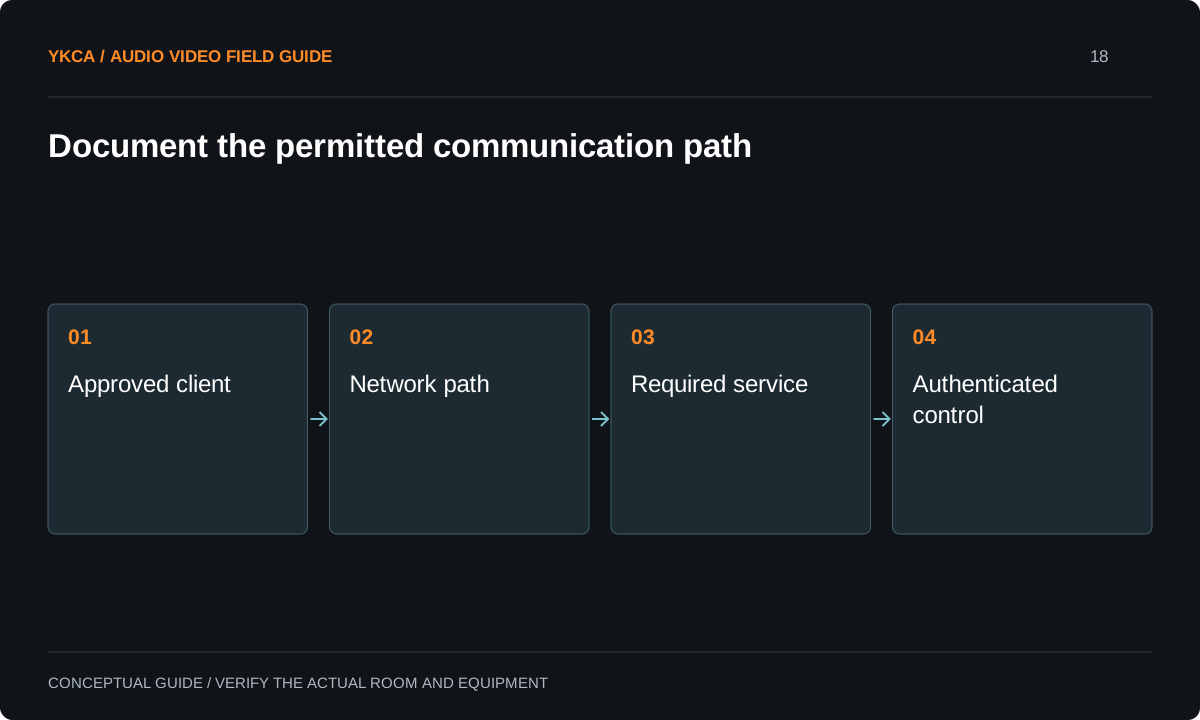
- Approved client
- Network path
- Required service
- Authenticated control
Agree on an evidence-producing test
Have AV and IT teams choose a permitted test from the working wired path and the failing wireless path. Record the destination, service, time and outcome. Some networks intentionally restrict diagnostic tools, so a failed ping alone may not answer whether the required application traffic is allowed. Ask IT to correlate approved test attempts with relevant network observations. Keep credentials out of tickets and screenshots. A useful report says that an identified client could or could not reach an identified service at a known time, rather than simply stating that all requested ports were opened or that the network must be fine.
Reference: Crestron: 4-Series Web Configuration · Crestron: 4-Series 802.1X
Consider a wireless-control failure
Imagine a tablet can open ordinary websites, while the processor’s approved interface works only from a wired service connection. IT confirms the intended wireless network assignment and reviews the specific application path. The AV technician also verifies that the tablet uses the right destination and supported authentication method. A controlled correction is then applied and tested from the actual operator location. If the design intentionally prohibits that wireless access, the next decision is an approved control method, not a hidden exception that bypasses organizational policy.
Test more than the first login
A successful login is a milestone, but the operator needs dependable control during actual use. Test the permitted actions, application restart and the normal reconnect behavior after the tablet sleeps. Verify expected operation from the places staff will use it, and document any wireless coverage limitations. Confirm that technician management access remains appropriately restricted. If certificates, network admission or account lifecycle affect the installation, identify who maintains them and how expiration or replacement will be handled. These responsibilities should be included before handoff, because a system that works only while the commissioning technician’s temporary access remains active is not finished.
Keep a shared network requirements record
Deliver the approved device inventory, network assignments, service requirements and responsibility matrix to the owner through the appropriate internal channel. Keep secrets in the organization’s secure credential system. Record the version of the equipment guidance used and the tested client application. AV changes that affect communication should trigger IT review, and network changes that affect these devices should include an AV check. The objective is not to turn operators into network engineers. It is to ensure that the people responsible for each layer have enough information to preserve the working path and diagnose a future failure without rebuilding the system from memory.
An audiovisual control system installation needs a network handoff before final commissioning day. Give IT the device list, intended client locations, required services, ownership and proposed test date while changes are still schedulable. Distinguish permanent operating access from temporary technician access and confirm how each will be removed or maintained. If the organization requires a managed tablet or certificate, account for that provisioning in the project sequence. This avoids an otherwise complete room waiting on an access decision that was never assigned. Keep the network requirements record concise enough for IT to review, while linking the specific manufacturer documentation that supports each requested communication path and authentication method.
Compare the next steps
A decision table for this problem
| Observation | Question for AV and IT | Evidence to compare |
|---|---|---|
| Wired works, Wi-Fi fails | Is the intended application path permitted? | Same service from approved clients |
| Internet works, controller does not | Is local-system access separately restricted? | Destination-specific test |
| Login page opens, controls fail | Are all required services supported? | Application actions and logs |
| Works until tablet sleeps | What reconnect behavior is expected? | Sleep and resume test |
| Temporary account works only | Who owns permanent access? | Approved identity and lifecycle |
Use this in the room
Your working checklist
Common questions
Should we put everything on one subnet?
Not as an automatic remedy. The final design must satisfy the equipment requirements and organizational network policy. Compare approved options with IT.
Does a failed ping prove the controller is offline?
No. Diagnostic traffic may be restricted or a different path may fail. Test the required service using an approved method and correlate with network evidence.
Can a personal tablet be the permanent controller?
That is an owner and IT decision involving access, support and availability. Document the approved device and account arrangement rather than assuming a technician’s tablet is an acceptable handoff.
Read the original guidance
Sources and discussion context
Research used primary documents and, where full text was unavailable, indexed excerpts from official sources. A citation does not mean the complete document was accessible. Product behavior depends on the actual model, configuration and documentation. Confirm the requirements for your venue before changing the installation.
Reader problems behind this guide
These Reddit discussions helped identify the practical question. They are individual experiences, not technical authority or a measure of how common the problem is. Examples and diagrams illustrate planning decisions; they are not records of completed YKCA projects or installation drawings.
- Understanding network issue with AV devices
A control processor was reachable from its wired switch but not from an iPad on a different Wi-Fi network.
Research access: search excerpt only.
Keep the whole system in view
